你好,其实你只需要在示例代码上换一个模型、改一些参数就行就可以,YOLOv8和YOLO11的模型输出是一样的,后处理步骤也是一样的。
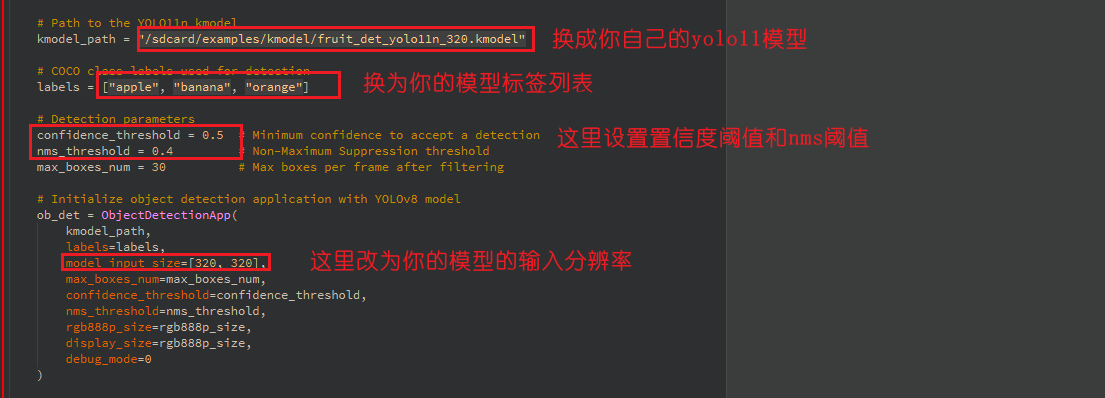
参考如下代码:
from libs.PipeLine import PipeLine
from libs.AIBase import AIBase
from libs.AI2D import Ai2d
from libs.Utils import *
import os,sys,ujson,gc,math, urandom
from media.display import *
from media.media import *
from media.uvc import *
import nncase_runtime as nn
import ulab.numpy as np
import image
import aidemo
from nonai2d import CSC

# Custom YOLO11 object detection class
class ObjectDetectionApp(AIBase):
    def __init__(self, kmodel_path, labels, model_input_size, max_boxes_num, confidence_threshold=0.5, nms_threshold=0.2, rgb888p_size=[224,224], display_size=[1920,1080], debug_mode=0):
        """
        Initialize object detection system.

        Parameters:
        - kmodel_path: Path to YOLO11 KModel.
        - labels: List of class labels.
        - model_input_size: Model input size.
        - max_boxes_num: Max detection results to keep.
        - confidence_threshold: Detection score threshold.
        - nms_threshold: Non-max suppression threshold.
        - rgb888p_size: Camera input size (aligned to 16-width).
        - display_size: Output display size.
        - debug_mode: Enable debug timing logs.
        """
        super().__init__(kmodel_path, model_input_size, rgb888p_size, debug_mode)
        self.kmodel_path = kmodel_path
        self.labels = labels
        self.model_input_size = model_input_size
        self.confidence_threshold = confidence_threshold
        self.nms_threshold = nms_threshold
        self.max_boxes_num = max_boxes_num

        # Align width to multiple of 16 for hardware compatibility
        self.rgb888p_size = [ALIGN_UP(rgb888p_size[0], 16), rgb888p_size[1]]
        self.display_size = [ALIGN_UP(display_size[0], 16), display_size[1]]
        self.debug_mode = debug_mode

        # Predefined colors for each class
        self.color_four = get_colors(len(self.labels))

        # Input scaling factors
        self.x_factor = float(self.rgb888p_size[0]) / self.model_input_size[0]
        self.y_factor = float(self.rgb888p_size[1]) / self.model_input_size[1]

        # Ai2d instance for preprocessing
        self.ai2d = Ai2d(debug_mode)
        self.ai2d.set_ai2d_dtype(nn.ai2d_format.RGB_packed, nn.ai2d_format.NCHW_FMT, np.uint8, np.uint8)

    def config_preprocess(self, input_image_size=None):
        """
        Configure pre-processing: padding and resizing using Ai2d.
        """
        with ScopedTiming("set preprocess config", self.debug_mode > 0):
            ai2d_input_size = input_image_size if input_image_size else self.rgb888p_size
            top, bottom, left, right, self.scale = letterbox_pad_param(self.rgb888p_size, self.model_input_size)
            self.ai2d.pad([0,0,0,0,top,bottom,left,right], 0, [128,128,128])
            self.ai2d.resize(nn.interp_method.tf_bilinear, nn.interp_mode.half_pixel)
            self.ai2d.build(
                [1, ai2d_input_size[1], ai2d_input_size[0], 3],
                [1, 3, self.model_input_size[1], self.model_input_size[0]]
            )

    def postprocess(self, results):
        """
        Apply YOLOv8 post-processing including NMS and thresholding.
        """
        with ScopedTiming("postprocess", self.debug_mode > 0):
            new_result = results[0][0].transpose()
            det_res = aidemo.yolov8_det_postprocess(
                new_result.copy(),
                [self.rgb888p_size[1], self.rgb888p_size[0]],
                [self.model_input_size[1], self.model_input_size[0]],
                [self.display_size[1], self.display_size[0]],
                len(self.labels),
                self.confidence_threshold,
                self.nms_threshold,
                self.max_boxes_num
            )
            return det_res

    def draw_result(self, img, dets):
        """
        Draw detection results and send label info via UART.
        """
        with ScopedTiming("display_draw",self.debug_mode >0):
            if dets:
                for i in range(len(dets[0])):
                    x, y, w, h = map(lambda x: int(round(x, 0)), dets[0][i])
                    img.draw_rectangle(x,y, w, h, color=self.color_four[dets[1][i]],thickness=4)
                    img.draw_string_advanced( x , y-50,32," " + self.labels[dets[1][i]] + " " + str(round(dets[2][i],2)) , color=self.color_four[dets[1][i]])


if __name__ == "__main__":

    # Align display width to 16 bytes for hardware requirement
    DISPLAY_WIDTH = ALIGN_UP(800, 16)
    DISPLAY_HEIGHT = 480

    # Create CSC instance for pixel format conversion (e.g., to RGB888)
    csc = CSC(0, CSC.PIXEL_FORMAT_RGB_888)

    # Initialize LCD display (ST7701) and enable IDE display
    Display.init(Display.ST7701, width=DISPLAY_WIDTH, height=DISPLAY_HEIGHT, to_ide=True)

    # Initialize media manager to manage frame buffers and UVC stream
    MediaManager.init()

    # Wait for USB camera to be detected
    while True:
        plugin, dev = UVC.probe()
        if plugin:
            print(f"detect USB Camera {dev}")
            break
        time.sleep_ms(100)

    # Select and configure UVC video mode: 640x480 @ 30 FPS, MJPEG format
    mode = UVC.video_mode(640, 480, UVC.FORMAT_MJPEG, 30)
    succ, mode = UVC.select_video_mode(mode)
    print(f"select mode success: {succ}, mode: {mode}")

    # Define input image from USB camera (sensor side)
    rgb888p_size = [640, 480]

    # Path to the YOLO11n kmodel
    kmodel_path = "/sdcard/examples/kmodel/fruit_det_yolo11n_320.kmodel"

    # COCO class labels used for detection
    labels = ["apple", "banana", "orange"]

    # Detection parameters
    confidence_threshold = 0.5  # Minimum confidence to accept a detection
    nms_threshold = 0.4         # Non-Maximum Suppression threshold
    max_boxes_num = 30          # Max boxes per frame after filtering

    # Initialize object detection application with YOLOv8 model
    ob_det = ObjectDetectionApp(
        kmodel_path,
        labels=labels,
        model_input_size=[320, 320],
        max_boxes_num=max_boxes_num,
        confidence_threshold=confidence_threshold,
        nms_threshold=nms_threshold,
        rgb888p_size=rgb888p_size,
        display_size=rgb888p_size,
        debug_mode=0
    )

    # Configure Ai2d preprocessing (resize + letterbox pad)
    ob_det.config_preprocess()

    # Start UVC video stream with pixel format conversion enabled
    UVC.start(cvt=True)

    clock = time.clock()

    # Main loop: acquire frame, run inference, draw and display
    while True:
        clock.tick()
        img = UVC.snapshot()
        if img is not None:
            # Convert format (e.g., to RGB888)
            img = csc.convert(img)
            # Convert to Ulab.Numpy.ndarray
            img_np_hwc = img.to_numpy_ref()

            img_np_nhwc=img_np_hwc.reshape((1,3,img_np_hwc.shape[0],img_np_hwc.shape[1]))

            # Run YOLOv8 inference on the current frame
            res = ob_det.run(img_np_nhwc)

            # Draw detection results on the frame
            ob_det.draw_result(img, res)

            # Show result on display
            Display.show_image(img)

            # Explicitly release image buffer
            img.__del__()

            gc.collect()

        # Print current frame rate
        print(f"fps: {clock.fps()}")

    # Clean up: stop display and media system
    ob_det.deinit()
    Display.deinit()
    csc.destroy()
    UVC.stop()
    time.sleep_ms(100)
    MediaManager.deinit()

